Super Admin Guide
Audience: Platform operators (super admins). Where you work: the admin console at
/admin/*. New here? Read the Platform Overview first.
A Super Admin operates the entire platform across all tenants. You can see and manage every dealer organization, buyer organization, order, and product, plus the catalog and other super admins. You are not tied to any single dealer or buyer org.
How super-admin access works: a user is a super admin when their account carries the
is_super_adminflag. This is verified on every admin API call and on each admin page; non-super-admins are redirected away. Super admins are managed from the Admins page (below) — there’s no dealer/buyer membership involved.
1. Platform dashboard
Your dashboard is a platform-wide rollup: total revenue, orders (and how many are pending), dealer/buyer/project counts, a 6-month revenue trend, top dealers by revenue, an order-status breakdown, and recent orders across all dealers.
Several super admin screens show real customers’ names and figures, so this guide does not include a picture of them: the dashboard, Buyers, Orders, Reports, and Admins.
It also includes an AQ Products API card to test the platform Products API connection and pre-warm the product-info cache.
The floating Ask AI button opens Quotestore Insights for platform-wide questions (revenue, dealers, order mix) and for how-to questions. How-to answers can use every role guide, and should say which role the steps apply to. It can return charts, tables, and KPI cards from live data.
The sidebar gives you: Dashboard, Dealers, Buyers, Multi-Org Buyers, Orders, Reports, Products, and Admins.
2. Dealers
The Dealers page lists every (non-archived) dealer organization with its Plan, Users, Projects, Buyer portals (against the plan’s limit), Contract-year volume (against the usage threshold) and Trailing 12 months volume.
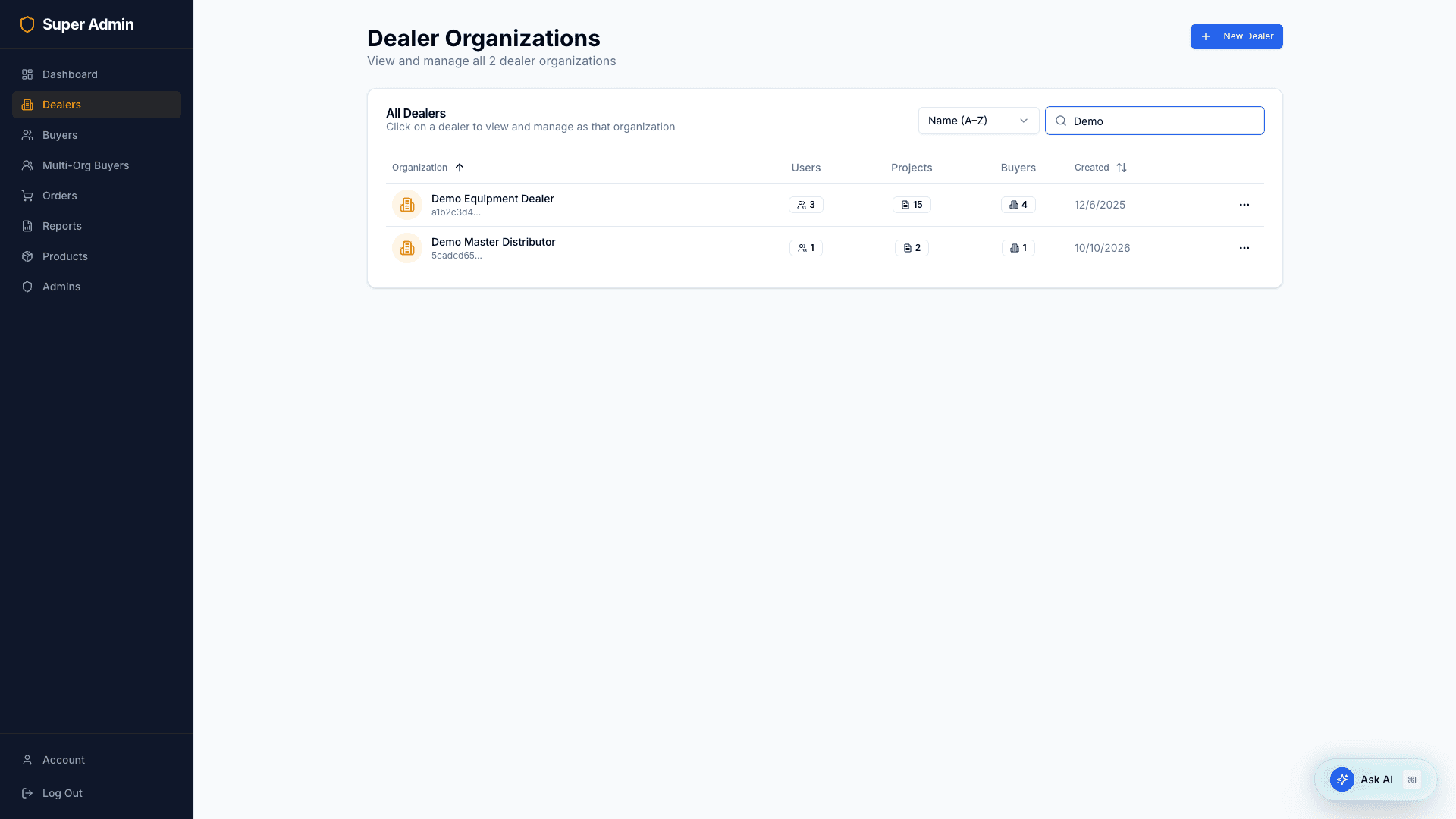
- New Dealer — create a dealer organization. Choose its plan (there is no default) and, if you know it, its contract start.
- Search by organization name.
- Sort with Name (A–Z), Name (Z–A), Newest first, or Oldest first — or click the Organization / Created column headers.
- Click a dealer to manage it; you can also archive a dealer from the list.
Dealer detail (manage as that dealer)
Opening a dealer gives you full administrative control of that organization. A banner makes it clear you’re operating in Super Admin Mode while viewing the dealer’s world.
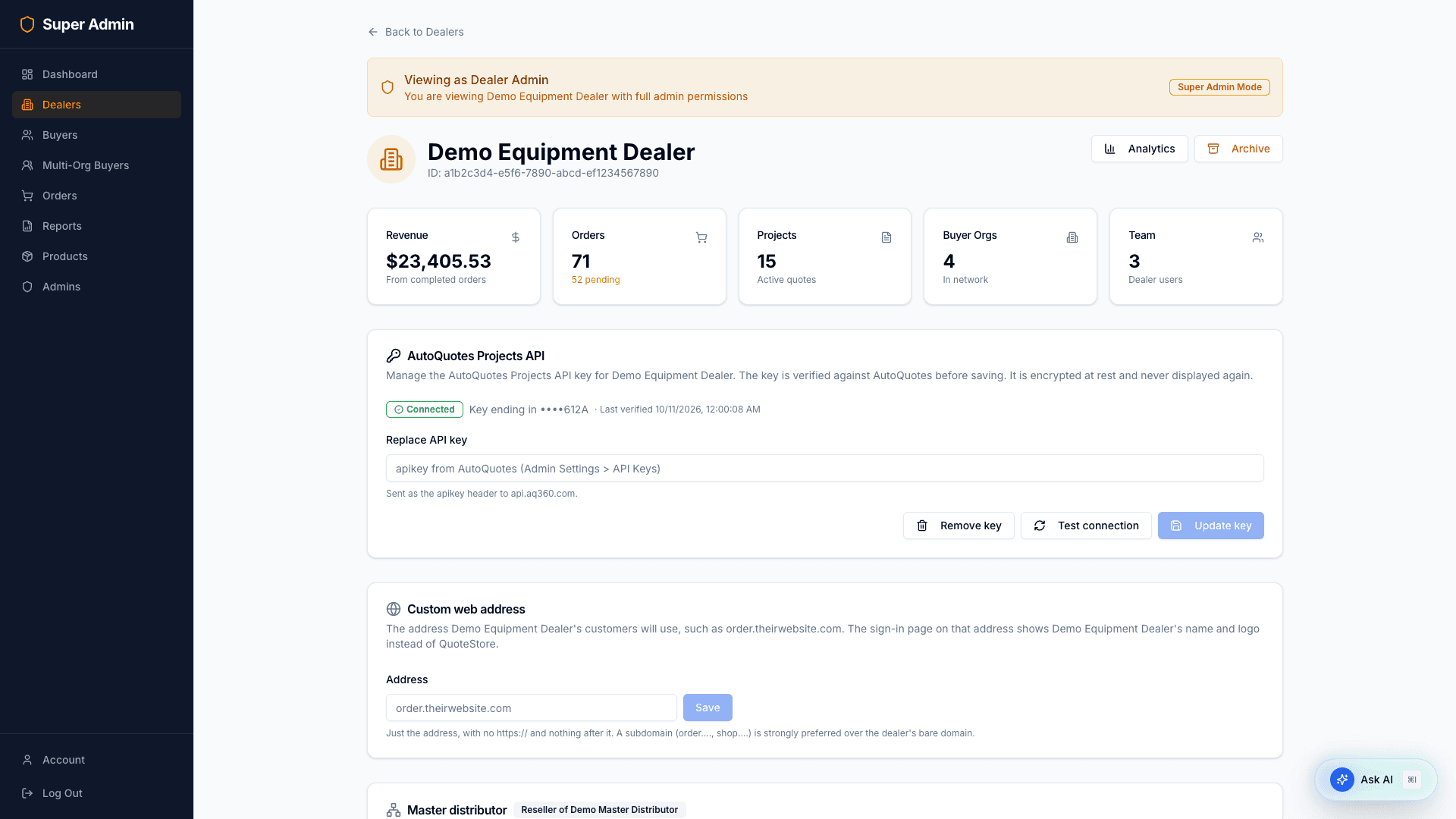
From here you can:
- See the dealer’s revenue, orders, projects, buyer-org, and team stats.
- Open the dealer’s Analytics, or Archive / restore the dealer.
- Configure the dealer’s AutoQuotes Projects API key (set, test, replace, remove).
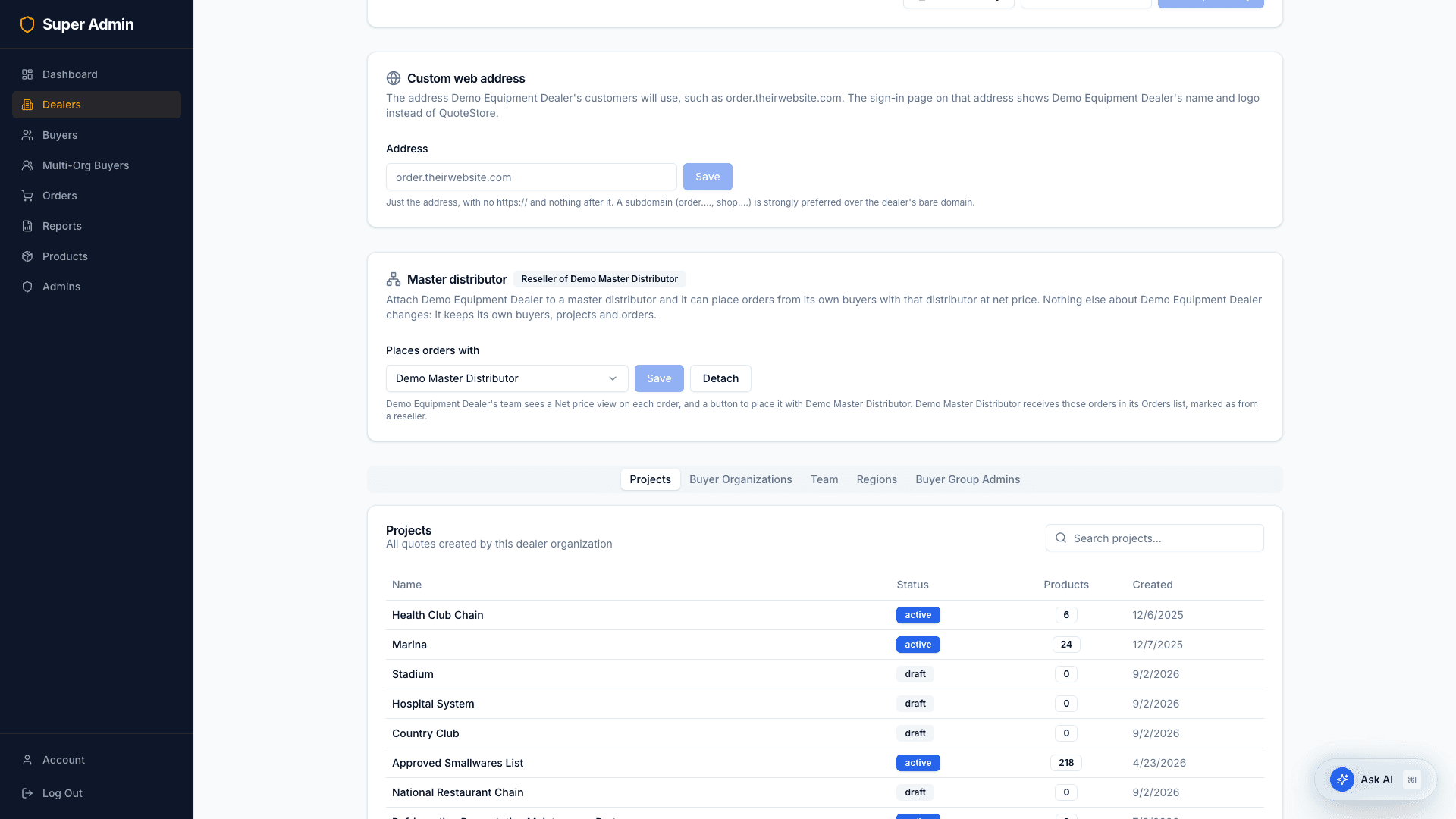
- Set the dealer’s Custom web address and its Master distributor (both below).
- Use the tabs to manage the dealer’s Projects, Buyer Organizations, Team, Regions, and Buyer Group Admins — including creating buyer organizations, inviting people, and changing their roles, assignments and status.
- Under Team and Buyer Group Admins, Invitations not yet accepted shows who has been invited and not signed up, and until when each link works. Resend sends a new link, good for 7 days; the × withdraws an invitation. A buyer organization’s Team tab has the same list.
- When you invite someone, choose a Role: the invitation is not sent without one.
- Drill into a specific project (
/admin/dealers/[id]/projects/[projectId]) to edit its name/status and manage buyer-org links, or a specific user (/admin/dealers/[id]/users/[userId]).
Plans and usage
Every dealer is on the Basic or Standard plan. QuoteStore works out what the plan allows and the order volume its usage fee is charged on; billing happens outside QuoteStore, from the monthly usage report.
| Basic | Standard | |
|---|---|---|
| Usage fee (defaults) | 0.50% of contract-year volume above $150,000 | 0.25% above $250,000 |
| Buyer portals | 25 | No limit |
| Multi-level dealer approval, Promotions, full Analytics, CSV order export | — | ✓ |
The Plan & usage card on a dealer’s page shows:
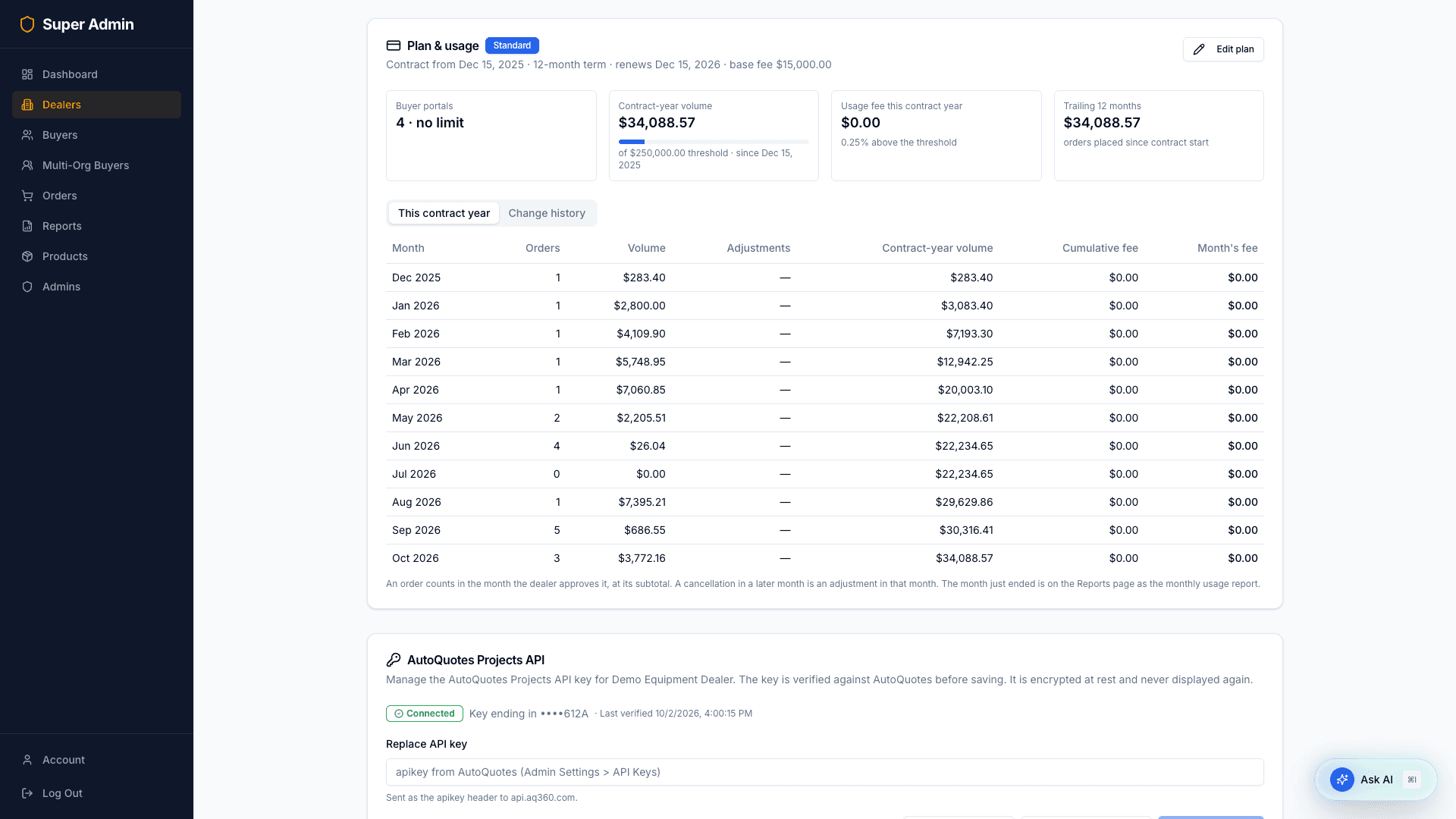
- The plan, the contract (start, term, renewal date) and the base fee.
- Buyer portals used against the limit; contract-year volume against the usage threshold; the usage fee the contract year has reached; and the trailing 12 months.
- This contract year, month by month: orders, volume, adjustments, contract-year volume, cumulative fee, and each month’s fee.
- Change history: every change to the plan or contract, with who made it and when, and any orders a downgrade released.
Edit plan changes the plan, contract start, term, base fee, and the dealer’s own usage rate, usage threshold and buyer portal limit. Leave the last three empty to use the plan’s defaults; a value there overrides them for this dealer only, for a negotiated deal. Add a note for the change history.
How volume is counted. An order counts at its subtotal (no tax or freight, after any changes the dealer made) in the month the dealer approves it, and only if it was placed on or after the contract start — so nothing counts until a contract start is entered. An order cancelled in a later month is a negative adjustment in the month it is cancelled; a month already closed never changes. Volume adds up over the contract year and starts again at each anniversary. An order a reseller places with its master distributor counts once, for the reseller.
Moving a dealer to Basic asks you to confirm first and tells you what will happen. Nothing is deleted. Orders waiting on a regional manager or admin move to Processing, as they would have with single-level approval, and their buyers are told. Promotions stop showing to buyers and are kept. Analytics drops to the monthly summary, and order export turns off. Moving to Standard turns everything on at once.
Buyer portal limit. Every buyer organization a dealer has created counts, except the hidden ones a master distributor has for its resellers. Creating one past the limit is refused here as it is for the dealer; raise the dealer’s limit in Edit plan instead, where the change is recorded.
Signing in as someone
Beside a dealer user, a buyer user, or a multi-org buyer there is an Impersonate button. It asks you to confirm, then signs you in as that person so you see exactly what they see. Sign out to return, then sign in as yourself again.
- It is only offered for someone who has accepted their invitation.
- What you do while signed in as a buyer is not counted in that dealer’s Analytics.
- Anything else you do is real: an order you place is a real order.
A dealer’s custom web address
A dealer can have the storefront on their own address, such as order.theirwebsite.com, with their name and logo on the sign-in page instead of QuoteStore.
On the dealer’s page, under Custom web address:
- Type the address and Save. Use a subdomain (
order.,shop.), not the dealer’s bare domain. - Click Copy and send the text to whoever manages the dealer’s website. It is the DNS record they need to add: a CNAME from their address to ours. If their DNS is on Cloudflare the record must be set to DNS only.
- The card says whether the address was added to our hosting for you. If it says to do it by hand, add it in Vercel (project
quotestore-storefront→ Settings → Domains). - Click Check connection. It reports separately whether the DNS record points at us, whether the address reaches QuoteStore securely, and whether the sign-in page there shows the dealer.
- If the check says the dealer must prove they own the domain, it shows a second record (a TXT record named
_vercel) with its own Copy button. Send that to the dealer too, then check again once it is in place. This happens when the dealer’s domain is already used with our hosting provider by someone else, usually because their own website is hosted there. The first record is still needed.
Once the check passes, the card shows Connected and emails to that dealer’s people link to their address instead of quotestore.pro. The address is re-checked every day; if it stops working, emails go back to quotestore.pro until it passes again.
On the dealer’s address, the sign-in, forgot-password, reset-password and accept-invitation pages all show the dealer’s name and logo, and password-reset emails carry them too.
Only a super admin can set this. An address can belong to one dealer only.
Master distributors and resellers
A master distributor is an ordinary dealer that other dealers buy from. Attaching a dealer to one makes it that distributor’s reseller: its team can then place an order from one of its own buyers with the master distributor at net price, and the master distributor receives it in its normal Orders list, marked as from a reseller.
On a dealer’s page, the Master distributor card:
- Places orders with — choose the master distributor from the list of dealers and select Save. Detach removes the link; orders already placed stay as they are, and no new ones can be placed.
- A dealer that already has resellers shows them here instead, and cannot itself be attached to a master distributor. To add a reseller, open the reseller’s page and attach it.
Nothing else about either dealer changes. Each keeps its own buyers, projects and orders. Only a super admin can make or remove this link.
Both dealerships are told in their Notifications when you attach or detach a dealer.
Once a dealer has at least one reseller, its own team gets a Resellers page in their sidebar listing every dealer you have connected to it, with each one’s orders. They can read that list but not change it.
To set one up from nothing: create the master distributor as a dealer in the usual way, invite its team, then open each reseller’s page and attach it.
On each reseller order the master distributor sees the reseller’s list price, discount string and net, so it can check the discount it gives. That needs nothing set up.
Its own cost and margin are optional. They appear only if the master distributor connects AutoQuotes and syncs projects that carry what its resellers order (the projects need not be linked to any buyer). Most master distributors will not, and then no cost is shown.
A dealer’s analytics
Analytics at the top of a dealer’s page opens that dealership’s buyer analytics exactly as its dealer admin sees it: what buyers search for, look at, and add to their cart, next to what they order, with the same filters and the same drill-ins into a product, a search, or a buyer organization. See the Dealer Guide for what each part means.
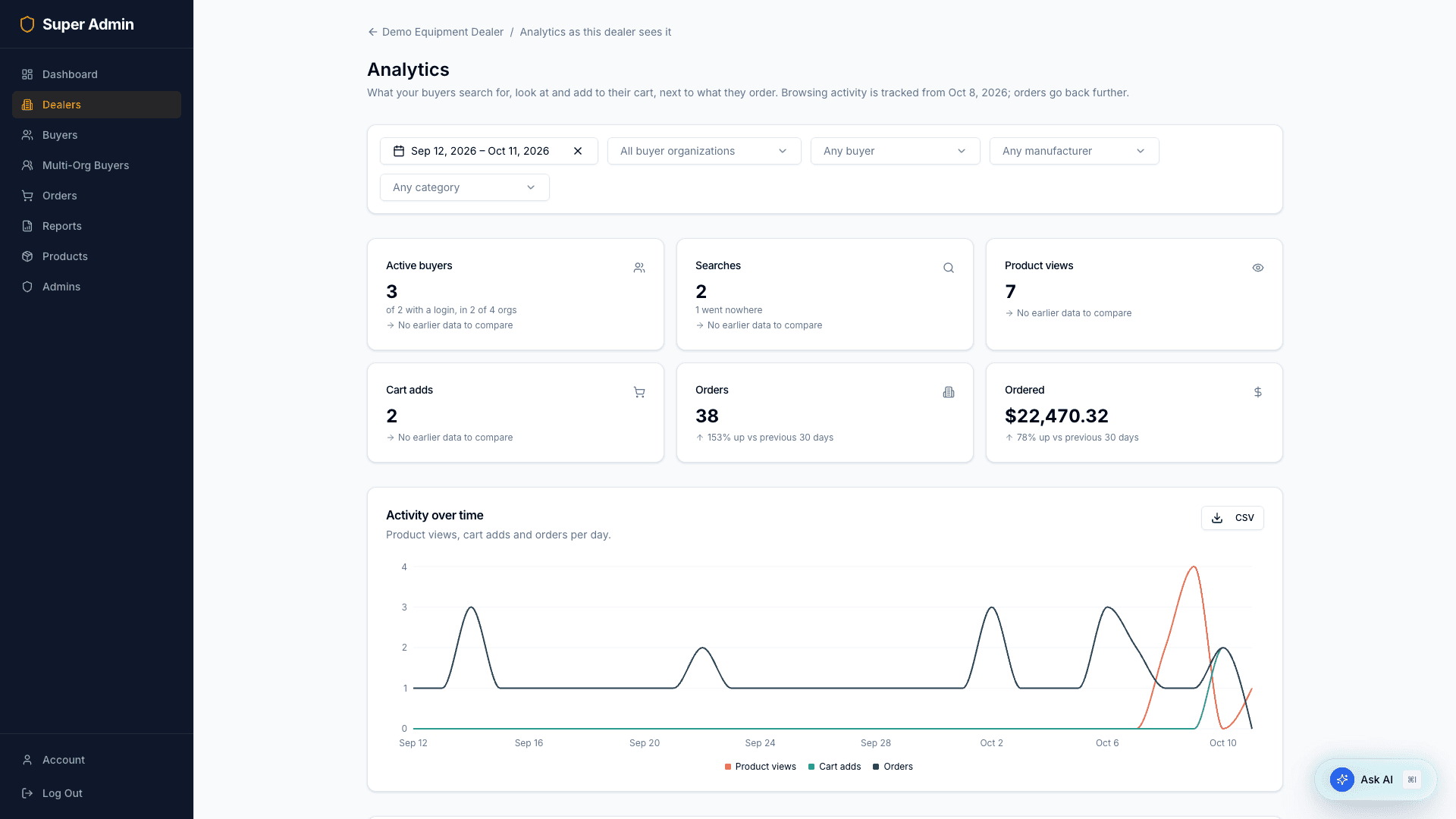
Note on “acting as”: the dealer detail experience lets you manage everything about a dealer from the admin console. It is a cross-tenant management view (with a “Super Admin Mode” banner) — your session always remains your own super-admin identity.
3. Buyers
A global list of every buyer organization across all dealers, with its dealer, region, district, and user count.
Open a buyer org to view its stats and dealer link, and to manage its orders and team (promote/demote/activate buyer users). Its Invitations not yet accepted list works as on a dealer’s page: Resend or withdraw.
The list includes one buyer organization per reseller under each master distributor, named for the reseller. Nobody signs in to it: it is how the master distributor’s copy of a reseller’s order has a buyer. It does not count toward the master distributor’s buyer portal limit.
4. Multi-Org Buyers (Buyer Group Admins)
A platform-wide view of all buyer group admins across every dealer, with a built-in explainer of what they are.
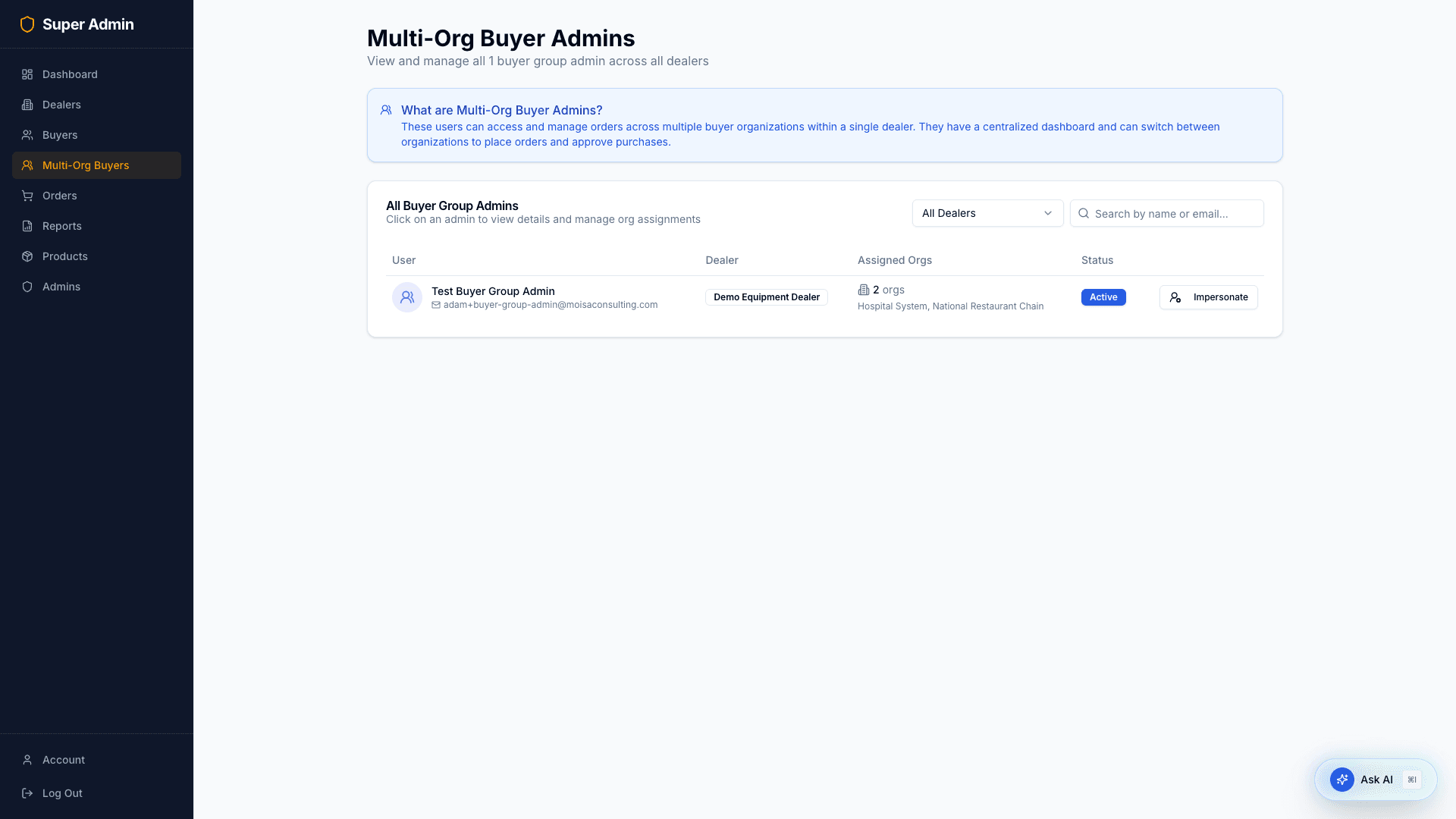
Open one to edit its name/active status, and assign or remove the buyer organizations it can access (or delete the record).
5. Orders
Every order on the platform, with status tabs and search by order ID.
Open an order to see full details, change its workflow_state directly (an operator override), and add comments as an admin. A configured product is one line, with each of its lines and that line’s own price listed under it; see the Dealer Guide.
Export CSV — the Export CSV button opens an Export Orders dialog where you choose a date range (by date placed), order statuses, and dealer organizations, then download a one-row-per-order CSV. The super-admin export includes a Dealer Org column. Payment is derived from whether the order has a paid timestamp (not the legacy payment_status field).
6. Reports
The Reports page makes per-dealer reports, stores them, and keeps them to download again anytime.
Monthly usage — what billing works from. One line per dealer: plan, usage rate, threshold, base fee, the month’s volume and number of orders, adjustments, contract-year volume, the cumulative fee, and this month’s fee; under each dealer, one line per adjustment (the order, when it was first approved, when it changed, and why); and the total of this month’s fees. A change to a dealer’s plan or terms during the month is noted on its line with the date, for proration.
- It is made automatically early on the 1st of each month for the month just ended, and appears in the history below.
- To make one for another month, or again, choose the Month and click Make usage report. The current month shows its figures so far.
- Rates and thresholds are each dealer’s as they are when the report is made.
Orders by Dealer — aggregated order totals, one row per dealer:
- Pick a date range (order placed; with quick presets), optional order statuses, and optional dealer organizations. Leave a filter empty to include everything.
- Click Generate Report. The CSV is built server-side, uploaded to secure storage (S3), and recorded in the history below.
Report History lists every report with its kind, its month or date range, filter summary, dealer count, and who made it (blank for the automatic monthly report). Each row has:
- Download — opens a short-lived presigned link to the stored CSV.
- Delete — removes the report and its stored file.
Difference vs. the Orders Export CSV: the export gives you raw per-order rows on demand; Reports produce saved, aggregated per-dealer summaries with a re-downloadable history.
An order a reseller places with its master distributor exists twice — the reseller’s order from its own buyer, and the master distributor’s copy — and Orders by Dealer counts each under its own dealer. Add the dealers up and that order is counted twice. The monthly usage report counts it once, for the reseller.
7. Products (global catalog)
The master product catalog — hundreds of thousands of products — searchable by name/model and filterable by manufacturer.
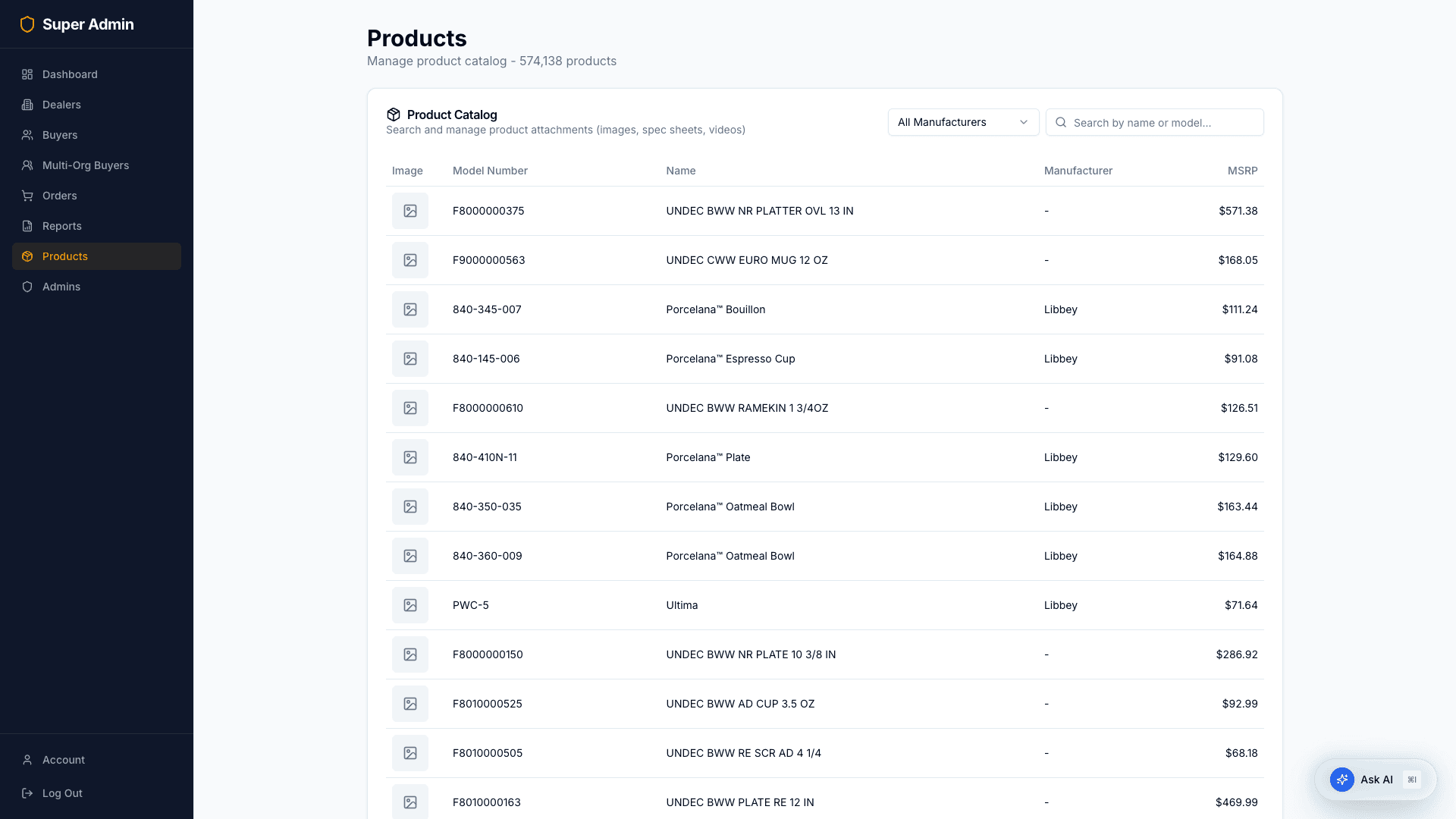
The list is read-only. Product names, images and spec sheets come from the AutoQuotes Products API, so there is nothing to upload or edit here.
8. Admins
Manage who has super-admin access to the platform.
- Invite Admin — grant super-admin access to a new or existing user.
- Send a password reset, edit a name, or remove an admin’s access. You cannot remove your own access.
9. What super admins manage (cross-tenant summary)
| Entity | Scope | Create | Update | Remove |
|---|---|---|---|---|
| Dealer orgs | All | ✅ | Plan and contract, API key, custom web address, master distributor, archive/restore | Archive |
| Buyer orgs | All | On the dealer’s page | User roles/status | — |
| Projects | Per dealer | — | Name, status, buyer links | Deactivate |
| Orders | All | — | Status, comments; export CSV | — |
| Reports | All dealers | Generate (monthly usage is also automatic) | — | Delete |
| Products | Global catalog | — | — (read-only) | — |
| Super admins | Platform | Invite | Name, revoke | Remove flag |
| Buyer group admins | All dealers | — | Profile, org assignments | Delete |
Quick reference — super admin routes
| Page | Path |
|---|---|
| Dashboard | /admin/dashboard |
| Dealers | /admin/dealers |
| Dealer detail | /admin/dealers/[id] |
| Project detail | /admin/dealers/[id]/projects/[projectId] |
| Dealer user detail | /admin/dealers/[id]/users/[userId] |
| Dealer analytics | /admin/dealers/[id]/analytics |
| Buyers | /admin/buyers |
| Buyer detail | /admin/buyers/[id] |
| Multi-Org Buyers | /admin/buyer-group-admins |
| Orders | /admin/orders |
| Order detail | /admin/orders/[id] |
| Reports | /admin/reports |
| Products | /admin/products |
| Admins | /admin/admins |