Buyer Guide
Audience: Buyer Admins and Buyer Users. Where you work: the storefront at
/catalog,/cart,/orders,/reorder-lists,/account. New here? Read the Platform Overview first.
As a buyer, this is your purchasing portal. You browse a catalog put together for your organization, build a cart, check out on Open Credit, and follow your orders through approval and delivery.
The portal carries your dealer’s name and logo, at the top of every page and on the emails you are sent. The menu across the top has Catalog, Promotions, Reorder Lists, and Orders; the icons on the right are notifications, reorder lists, your cart, and your account.
The floating Ask AI button answers how-to questions from this guide. A buyer user only gets buyer steps. A buyer admin also gets approval, address, and team instructions.
1. Buyer Admin vs Buyer User
Both roles belong to a single buyer organization and shop the same catalog. The difference is authority:
| Capability | Buyer User | Buyer Admin |
|---|---|---|
| Browse catalog, build cart, submit orders | ✅ | ✅ |
| Manage reorder lists | ✅ | ✅ |
| See the organization’s orders | ✅ | ✅ |
| Approve / reject orders that need internal approval | ❌ | ✅ |
| Manage org addresses | ❌ | ✅ |
| Manage the org team (invite/promote/remove users) | ❌ | ✅ |
Orders that need an admin’s approval
A buyer admin decides whether orders need sign-off inside your organization before they go to your dealer:
- For everyone who is not an admin — on Account, under Order Approval, turn on Require admin approval for orders.
- For one person — on the Team page, open the menu beside their name and choose Require approval for orders.
An order that needs approval waits in Pending Approval until a buyer admin approves it. Your dealer cannot see it until then. An admin’s own orders never wait.
2. The catalog
The catalog aggregates products from every active project your dealer has linked to your organization. Use the Search products… bar (name, model, manufacturer, or description), the sort control (Price or Name), and the Category / Manufacturer filters in the sidebar to narrow things down. When you search, results are ranked by relevance.
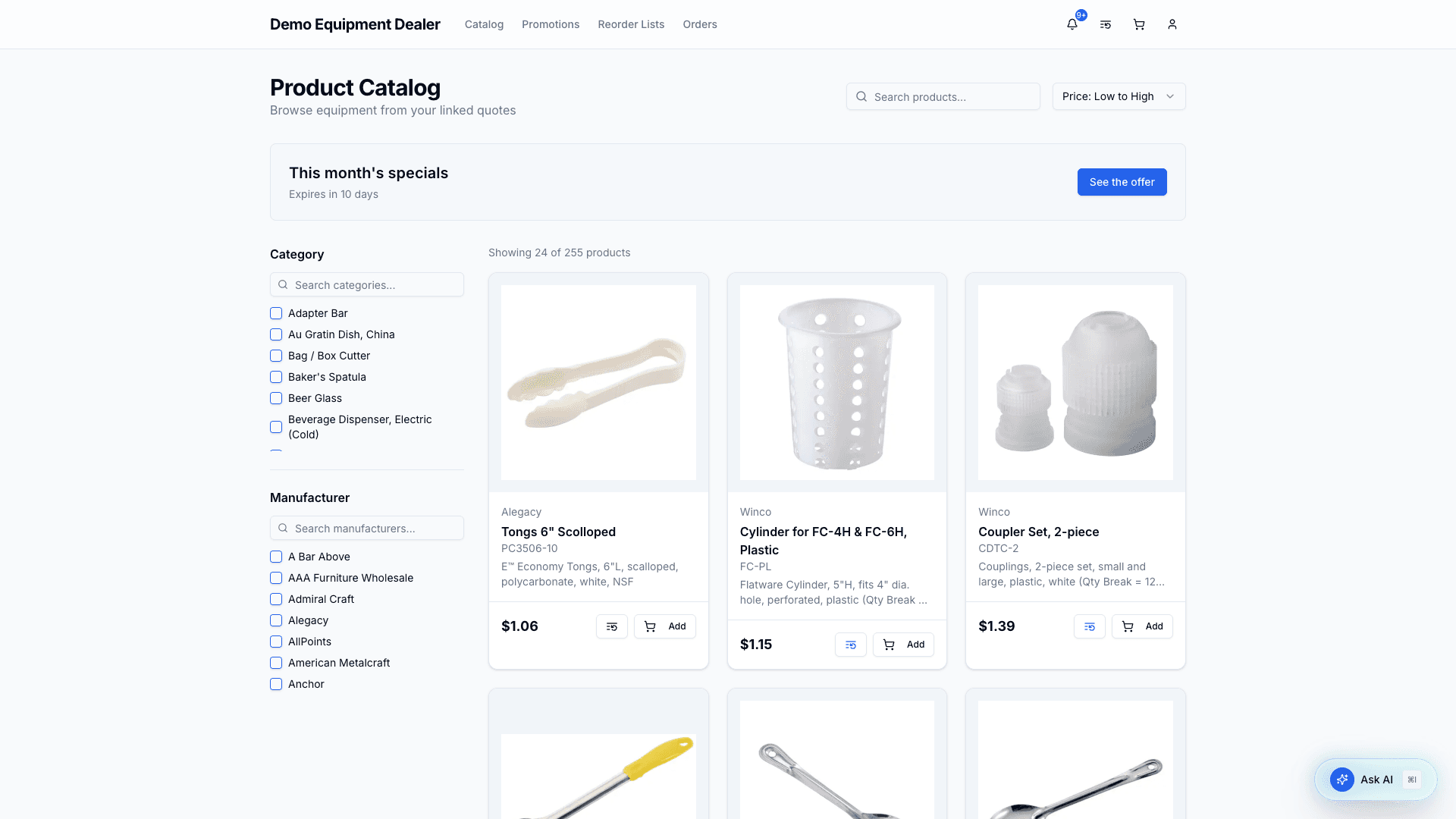
From each product card you can Add to cart directly or save it to a reorder list (the list icon).
You see each product once, at your price. Your dealer may carry the same item in more than one of the catalogs they have given you; you always get the lowest of those prices.
Products that come configured
Some products arrive already configured by your dealer: an oven with its voltage, lift and start-up visit, or an ice maker with its bin. A configured product is one product at one price.
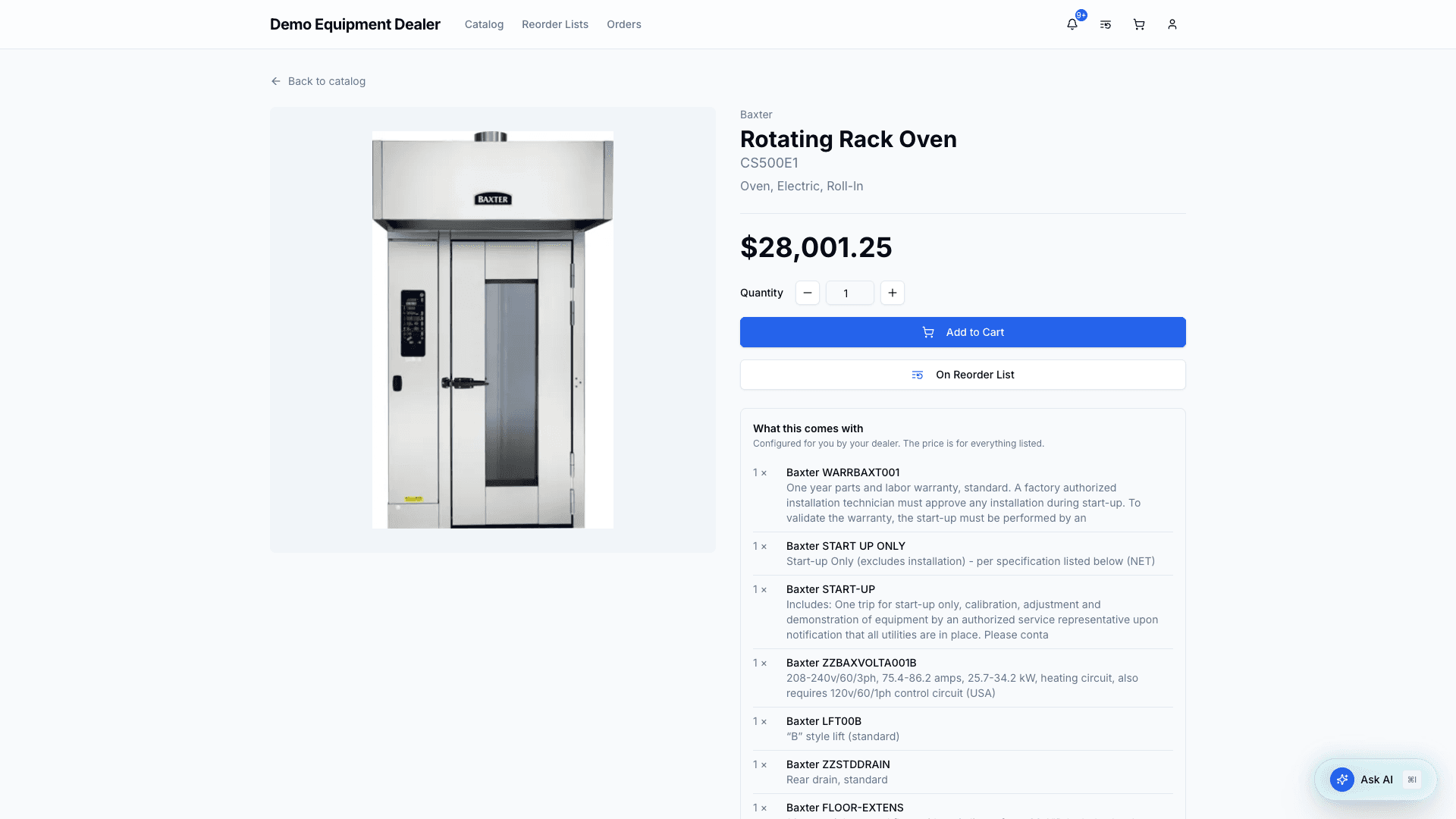
- Its tile and its page list what it comes with. The price covers everything listed.
- You cannot leave out or change what it comes with. If you need it configured differently, ask your dealer.
- Searching for something a product comes with, such as the ice bin, finds the product it is part of.
- In your cart and on your order it stays one line, with what it comes with listed underneath.
The same model can appear more than once when your dealer offers it configured in different ways. Check what each comes with.
Product detail
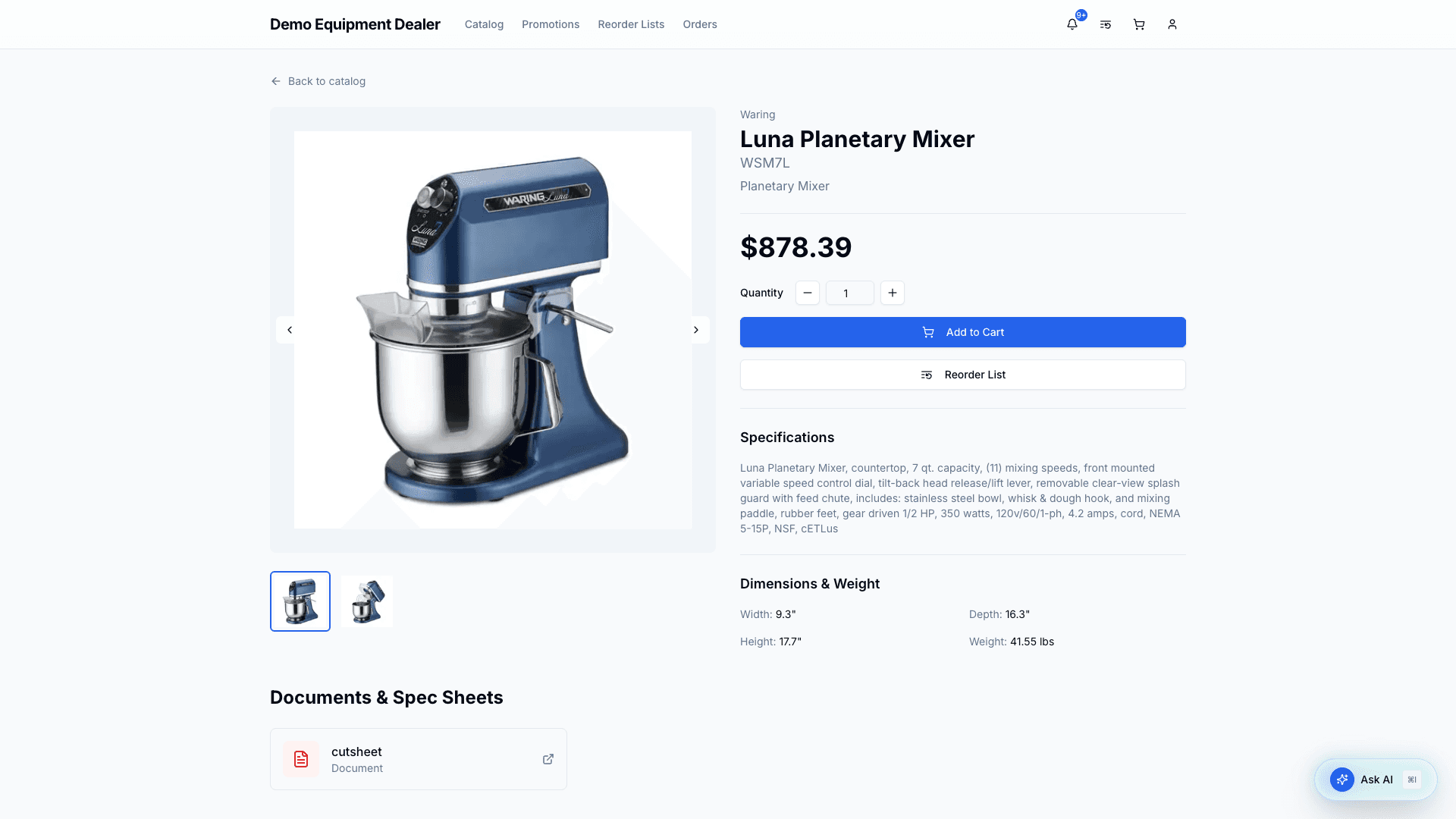
Click a product to see its full detail: image, price, specifications, dimensions & weight, and any documents or spec sheets. Set a quantity and Add to Cart, or add it to a reorder list.
Below the product, Related products suggests similar items from your quotes — and sometimes from the broader catalog that are not on your quotes yet.
Requesting a product that is not on your quotes
Some suggestion cards show Price on request. Those items are not on any of your organization’s quotes, so you cannot add them to the cart. Click Request this product (optional note) to ask your dealer to add the SKU. The button then reads Requested. Your dealer works the request in their Product requests inbox and can email you when it is processing, added, or declined.
Promotions
Your dealer can feature products for you. When there is a live promotion for your organization, it appears at the top of the catalog — either as a banner with a headline and a button, or as a row of featured products with your prices — and on the Promotions page in the top navigation. When nothing is being promoted, neither appears.
The Promotions page shows each promotion in full, with every product on it. A banner’s button on the catalog, and See all on a row of products, take you straight to that promotion there.
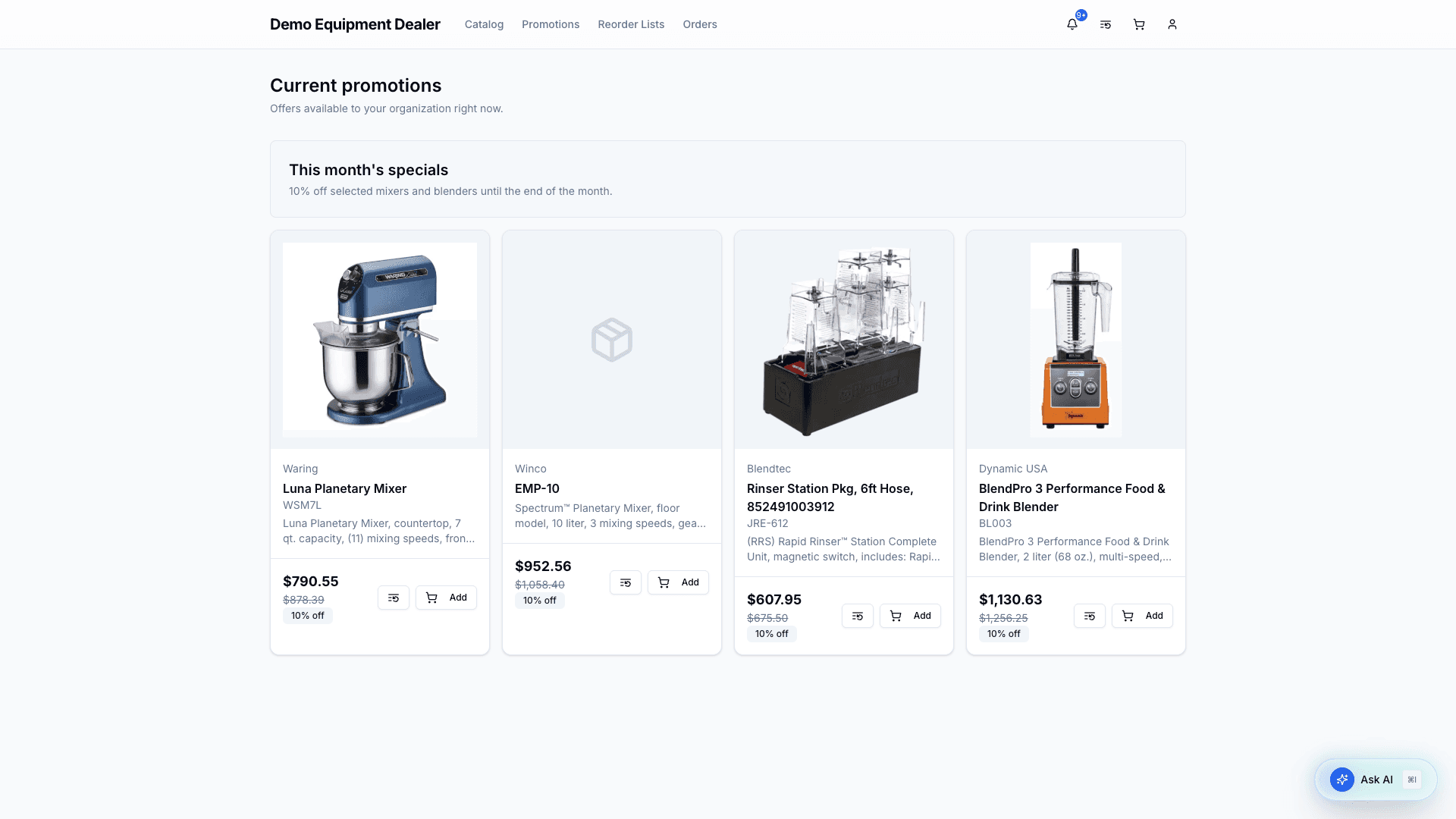
Promoted products are ordinary catalog products, and Add puts them in your cart like anything else. When a promotion includes a discount, you see the promotional price with your usual price struck through — on the catalog, the product page, and in your cart — and that is the price you pay at checkout while the promotion is running. Once you place an order its prices are fixed, even if the promotion ends before the order is approved; the order shows which promotion applied. Searching or filtering the catalog hides the promotions so they do not get in the way of your results.
3. Cart & checkout (Open Credit)
The cart is also your checkout page. It shows your line items with quantity controls, your Open Credit status, an order summary with estimated sales tax, and the billing/shipping address forms. When the cart has items, a Suggested for you rail appears with related products (and up to two Price on request items you can ask your dealer to add).
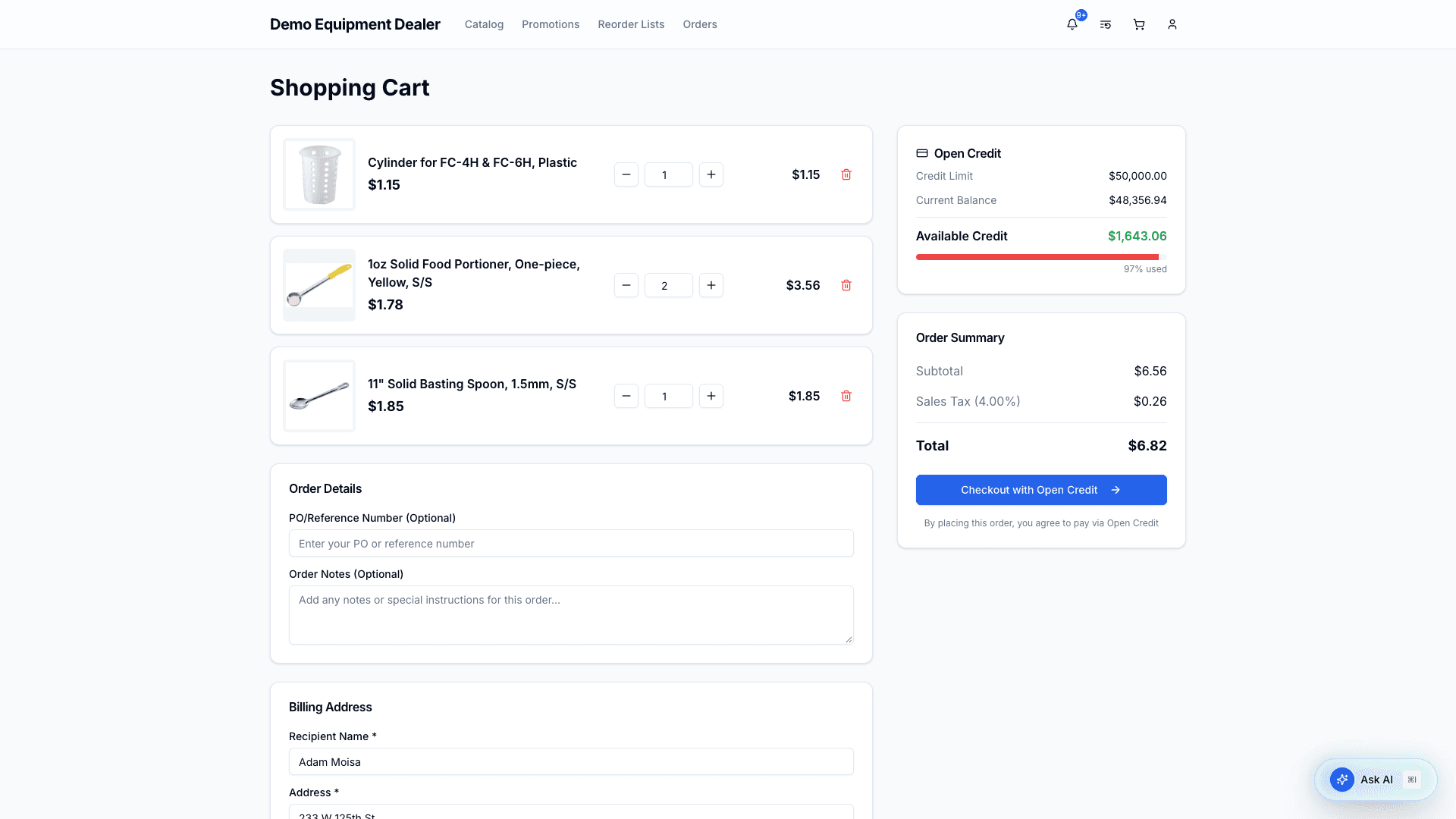
The Open Credit panel shows your Credit Limit, Current Balance, and Available Credit (with a usage bar). Your order total must fit within available credit.
To check out:
- Adjust quantities or remove items.
- (Optional) Add a PO/Reference Number and order notes.
- Confirm your billing and shipping addresses.
- Click Checkout with Open Credit.
What happens next depends on your org’s settings and your role:
- If buyer-admin approval is required and you’re a non-admin → the order starts in Pending Buyer Approval (waiting for a buyer admin).
- Otherwise → the order goes straight to Pending Dealer Review.
Either way, the order total is taken out of your available Open Credit straight away, product snapshots are recorded, and your cart is cleared. The amount comes back if the order is cancelled or rejected, and when your dealer marks it paid.
4. Your orders
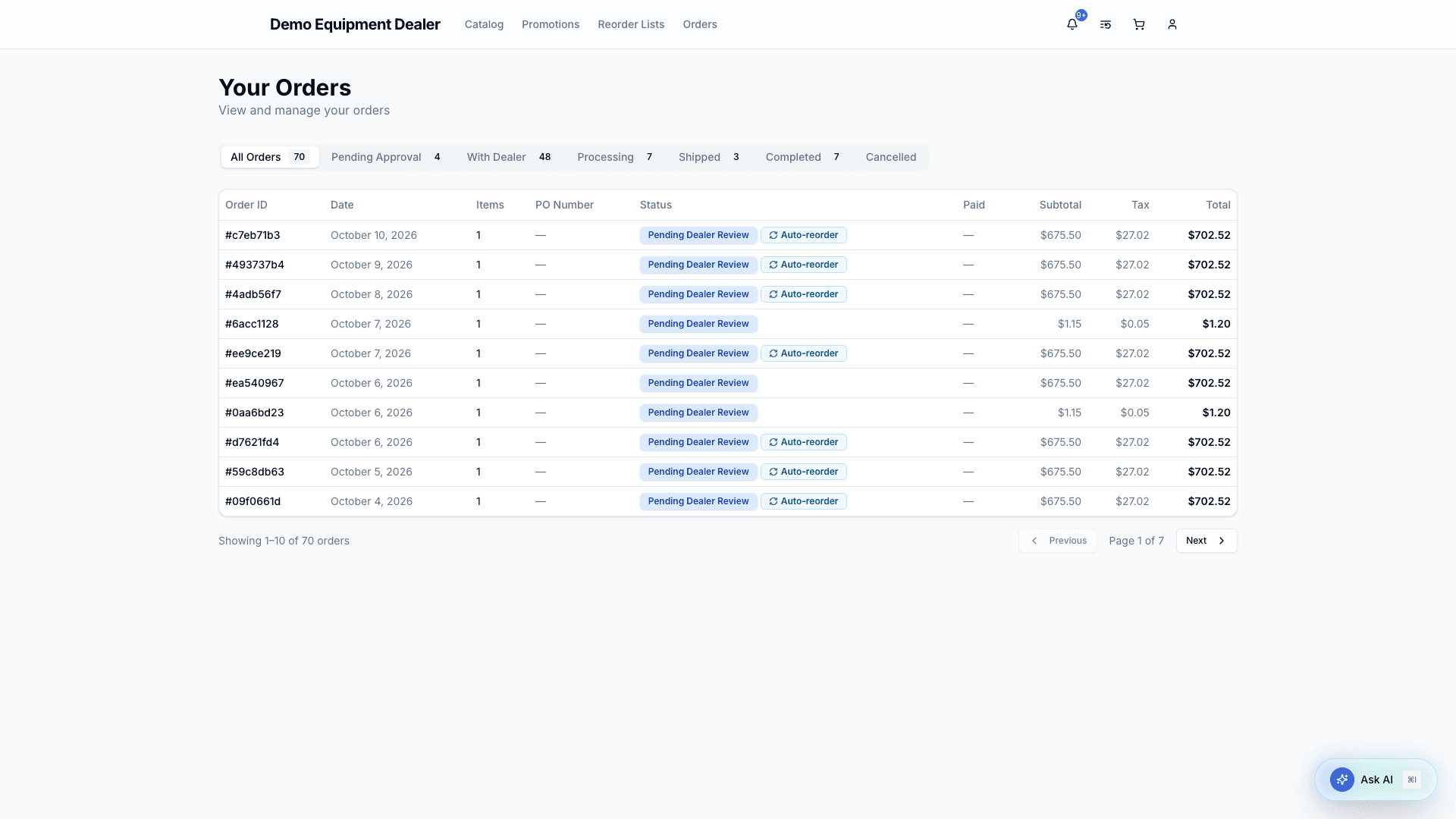
The Orders page lists your organization’s orders with status tabs (All Orders, Pending Approval, With Dealer, Processing, Shipped, Completed, Cancelled). An order waiting on your answer to your dealer’s changes (Changes Requested), or on a second approval at your dealer (Pending Regional or Pending Admin), is listed under All Orders. Buyer admins also see an Open Credit Status panel.
Order detail
Open an order to see its items, summary, payment status, addresses, and the comment thread with your dealer.
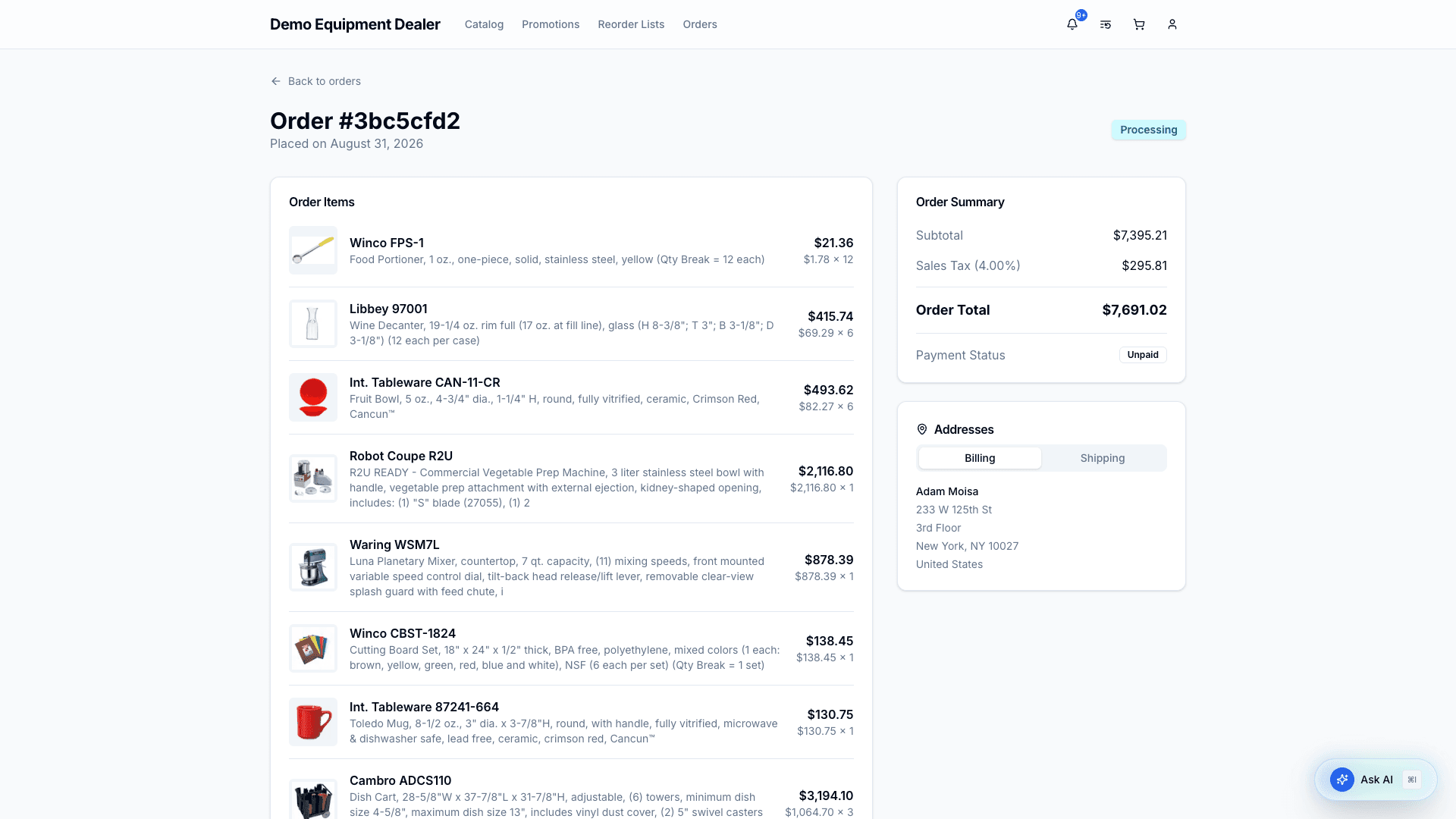
All buyers can add shared comments to collaborate with the dealer. New comments appear live (no refresh). Comments the dealer marks as internal are never shown to you.
On backorder. When your dealer approves an order, they can mark lines that will not ship with the rest. Those lines show On backorder on the order, with the dealer’s note if they left one, and the approval email lists them.
Changes from your dealer. Your dealer can change an order while reviewing it: change quantities, remove lines, or add products from your catalog at your price. The order then shows what changed — lines they added are marked Added by your dealer — and waits for a buyer admin.
You are told at each step, under the bell and by email: when an order is approved, when changes are requested, when it is rejected, shipped, and completed, and when your dealer writes to you. See Notifications to choose which of these you get.
Approving and rejecting orders (buyer admins)
Buyer admins get extra actions depending on the order’s state:
- Approve an order that’s pending buyer approval → sends it to the dealer.
- Reject it (with a comment) → cancels it and releases the credit hold.
- Accept Changes when the dealer has changed the order → it goes back to your dealer to approve. The credit held for the order already follows its new total from the moment the dealer changed it.
- Reject Changes → you must say why. Every change is undone, the order goes back to what you placed, and your dealer gets it back with your reason.
5. Reorder Lists
Reorder lists let you save products to buy later or share a standard reorder list. Create a list from the New Reorder List button or from a product card. You can rename a list from the list card or the detail page (pencil).
The index and each list also show Suggested for you — products related to what you already saved, including Price on request items you can send to your dealer.
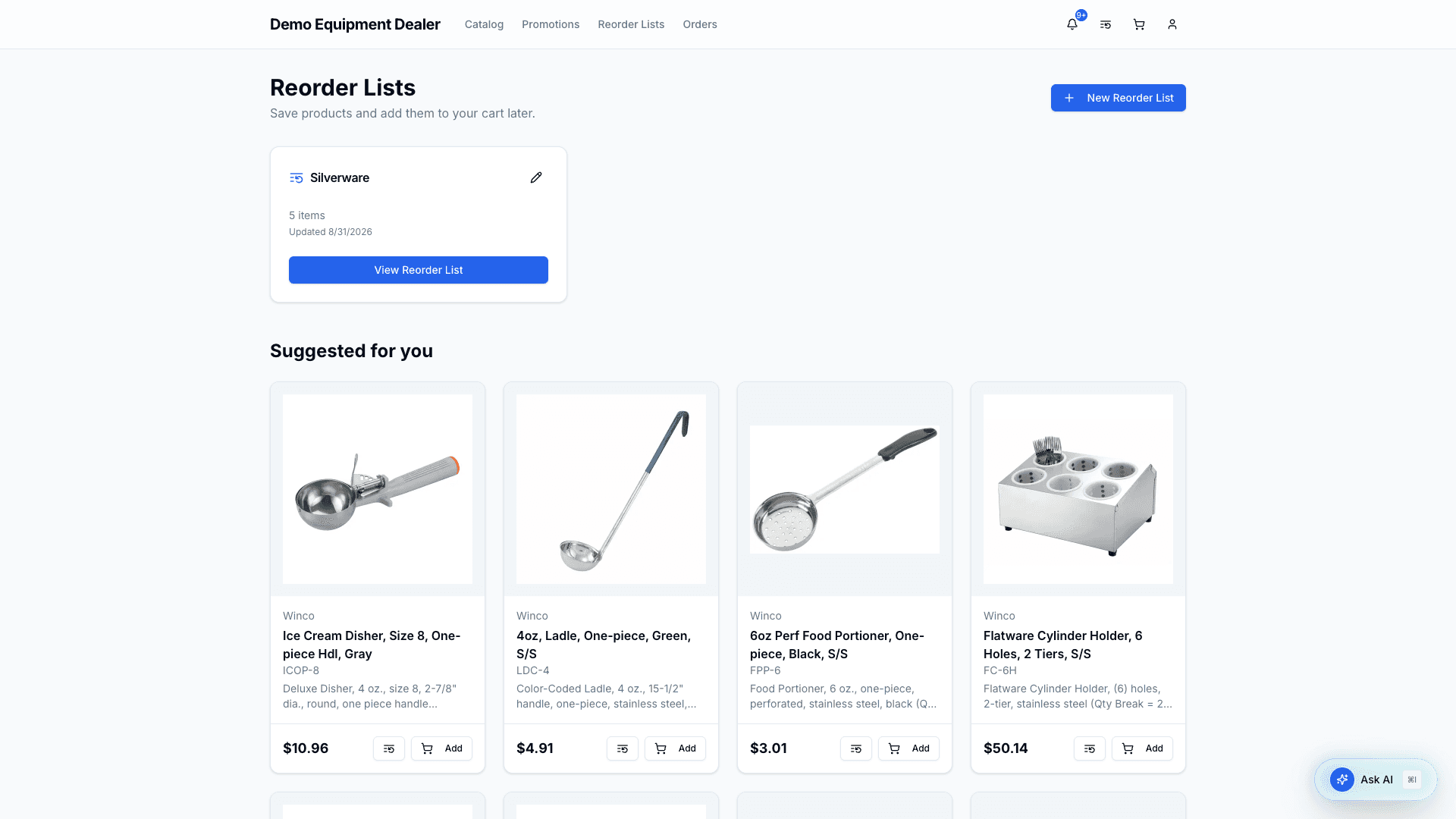
Open a reorder list to manage quantities, remove items, and see availability. Use Add All Products to Cart to move everything (that’s still available) into your cart in one click.
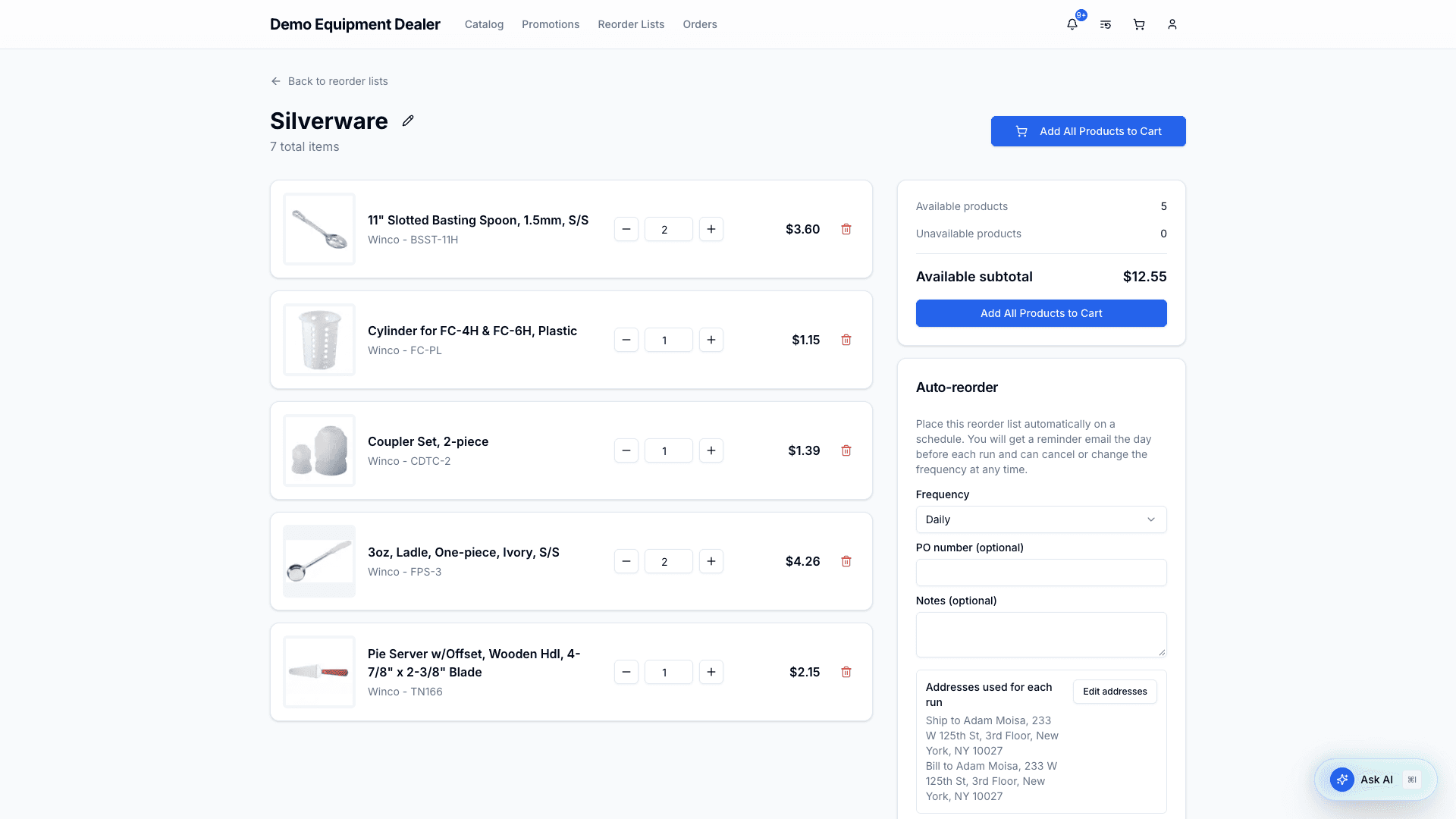
Auto-reorder
On a reorder list, you can set up auto-reorder to place that list on a schedule. Frequency defaults to Daily. You can also choose weekly (with a day of week), monthly (day 1–28), or a custom interval (every N days, weeks, or months). Each run uses the current list contents (skipping anything that’s no longer available) and the billing/shipping addresses saved on the schedule.
The order is placed the same way as checkout: if your organization requires buyer-admin approval and you are not an admin, it starts there; otherwise it goes to the dealer for review. If a run would exceed available credit, QuoteStore skips that run, notifies you, and keeps the schedule active.
The day before a scheduled run, QuoteStore emails the person who set it up so they can change the frequency, pause, or cancel before the order is placed. Auto-placed orders are marked Auto-reorder on order lists and order details for buyers and dealers.
You can change frequency, addresses, PO, or notes and save the schedule at any time. You can also pause, resume, or cancel. Recent runs appear on the reorder list with links to any orders that were placed.
6. Account & team
Your account page shows your profile (with your role), your organization’s billing and shipping addresses, and — for buyer admins — the Order Approval setting and a Manage Team shortcut.
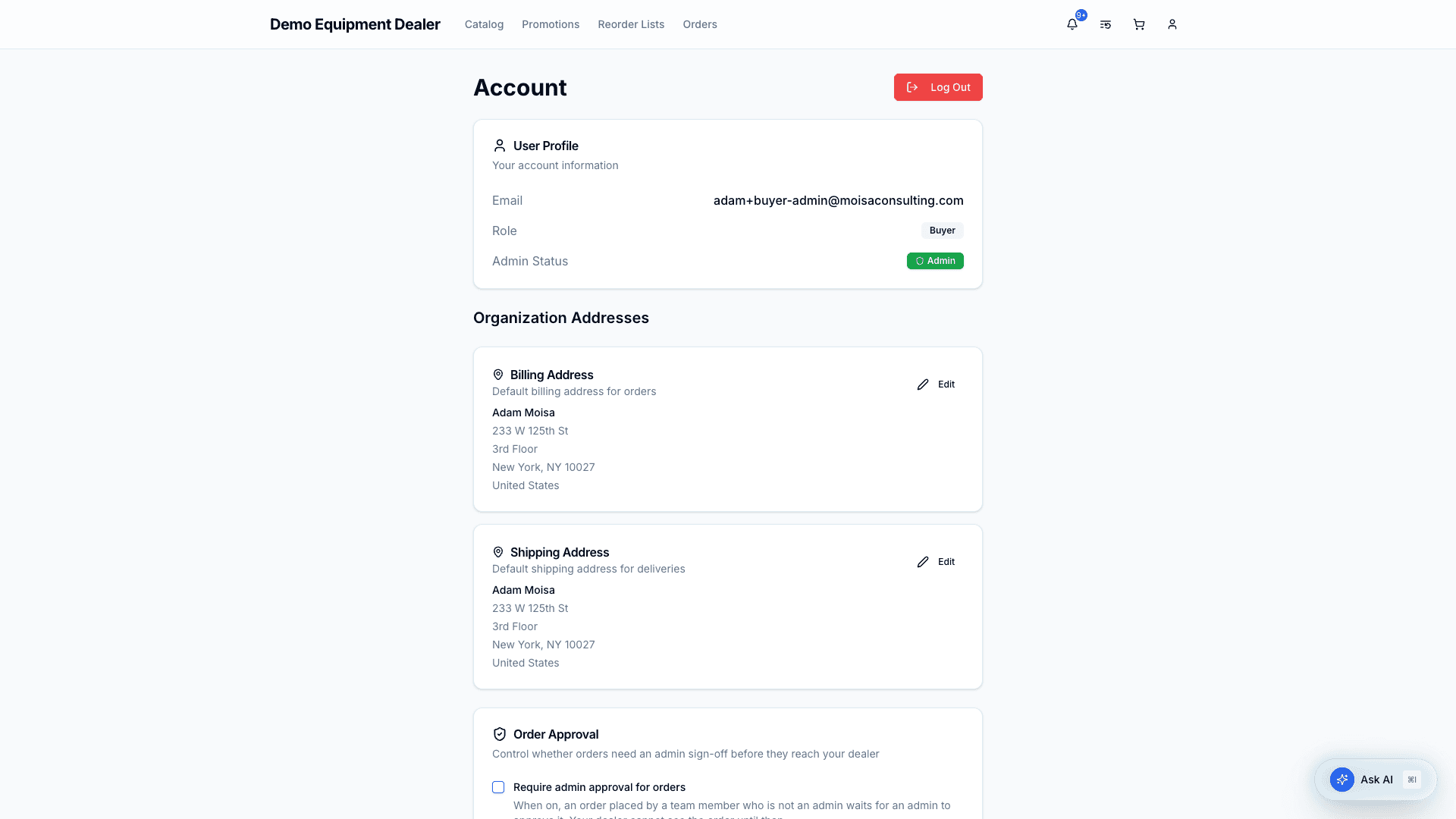
Forgot your password? Choose Forgot password? on the sign-in page and you are emailed a link to set a new one.
Team management (buyer admins only)
Invite teammates as Admin (can manage the team and approve orders) or User. They are emailed an invitation and choose their own password. From the menu beside each person you can promote or demote them, deactivate them, require approval for their orders, or remove them.
Invitations that have not been accepted are listed under the team, with until when each link works. A link works for 7 days; Resend emails a new one, and the × withdraws the invitation.
7. Notifications
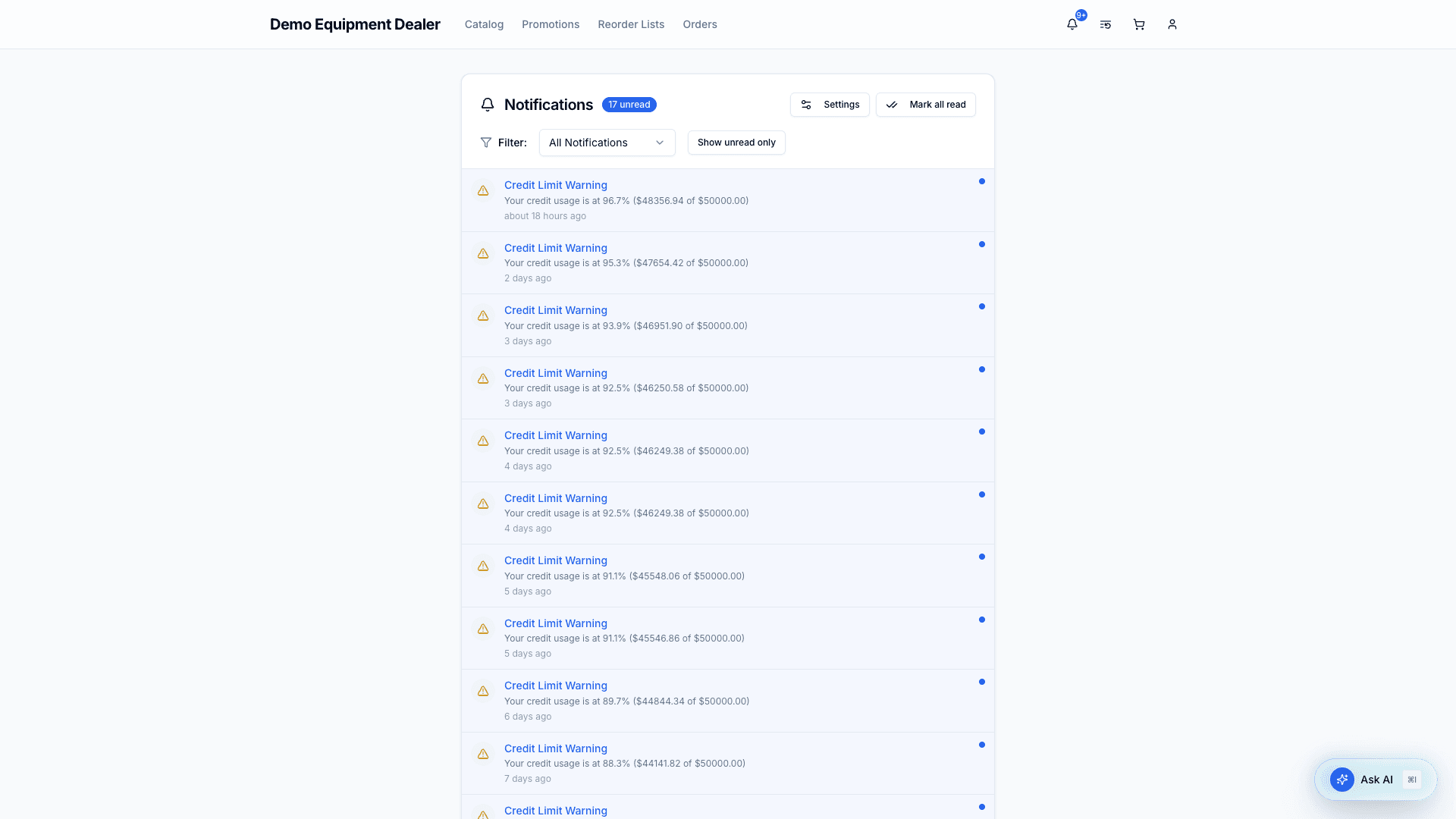
The bell at the top of the page shows what has happened that concerns your organization: an order approved, rejected, shipped or completed, changes your dealer has asked you to accept, a message from your dealer, a new set of products made available to you, credit-limit warnings, and auto-reorders that were skipped. Most of these are also sent to you by email.
Choosing what you receive
Open View all notifications from the bell and select Settings.
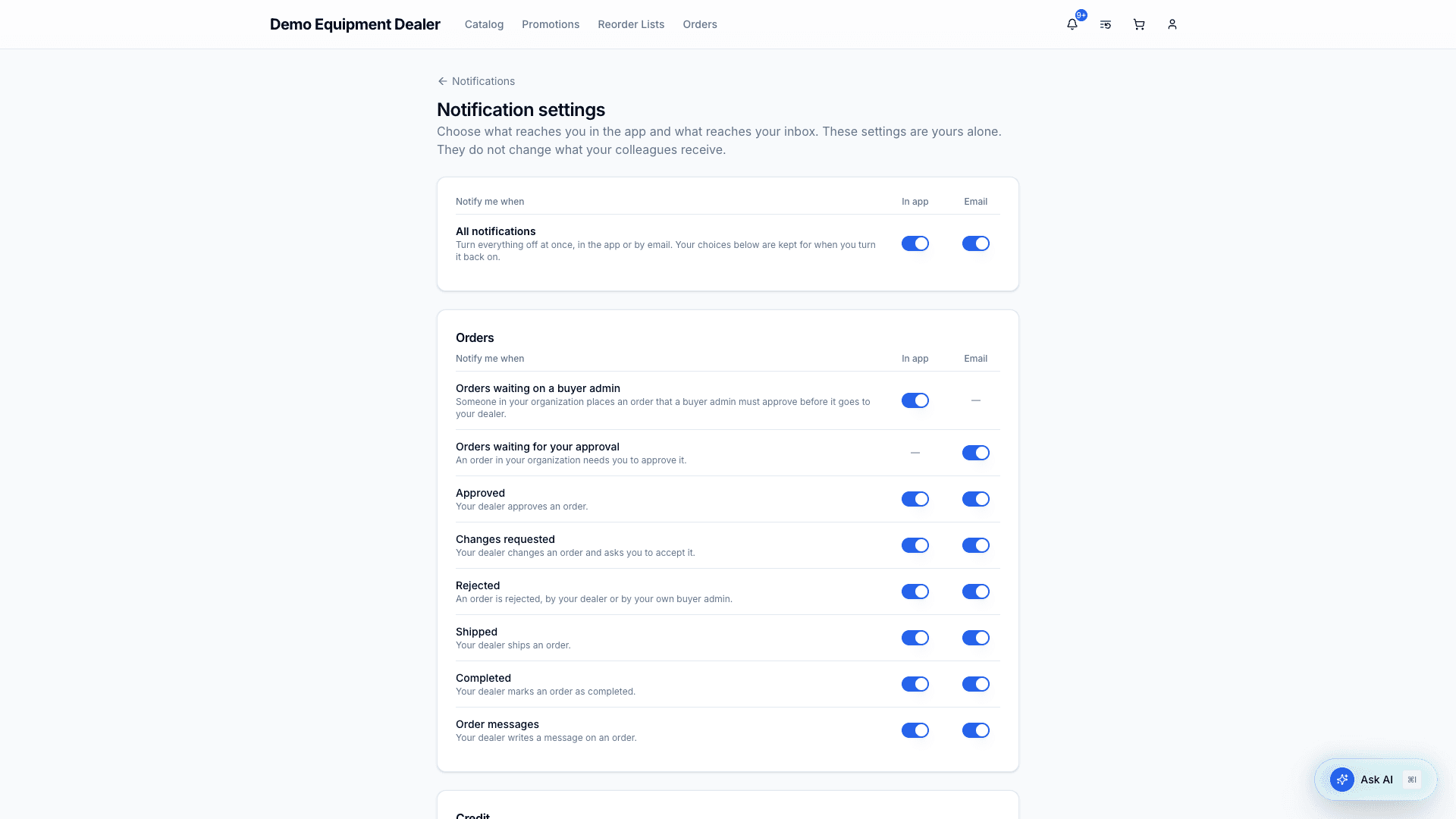
- Each notification has its own switch for In app and for Email. A dash means it is not sent that way.
- All notifications at the top turns everything off at once, in the app or by email, and keeps your choices underneath for when you turn it back on.
- The list shows only what can reach you. Buyer admins have a few more, such as Orders waiting for your approval.
- These settings are yours alone and do not change what others in your organization receive.
Emails about your own account, such as invitations and password resets, are always sent.
Quick reference — buyer routes
| Page | Path |
|---|---|
| Catalog | /catalog |
| Product detail | /catalog/[id] |
| Promotions | /promos |
| Cart & checkout | /cart |
| Orders | /orders |
| Order detail | /orders/[id] |
| Reorder Lists | /reorder-lists |
| Reorder list detail | /reorder-lists/[id] |
| Account | /account |
| Notifications | /notifications |
| Notification settings | /notifications/settings |
Admin-only routes
| Page | Path |
|---|---|
| Team | /account/team |